Regeneron Pharmaceuticals, Inc. is an American biotechnology company headquartered in Westchester County, New York.
My Role
User Research
User Interviews
Journey Mapping
Sketching
Wireframing
Screen Flows
Visual Design
Platforms
Web
Year
2023 - 2024
PROBLEM
Background
The main purpose of the portal is to serve and help users navigate through applications, including self-service insight apps, to search, access, approve, and utilize other personalization capabilities.
.
The Problem
Researchers currently do not have unified access to all research programs in the Regeneron pipeline. This leads to a lack of information sharing and knowledge transfer inside the organization. This new desktop tool for internal research leadership will allow real-time status updates regarding various experiments taking place across their drug development pipeline to stay informed wherever, whenever.
The Personas
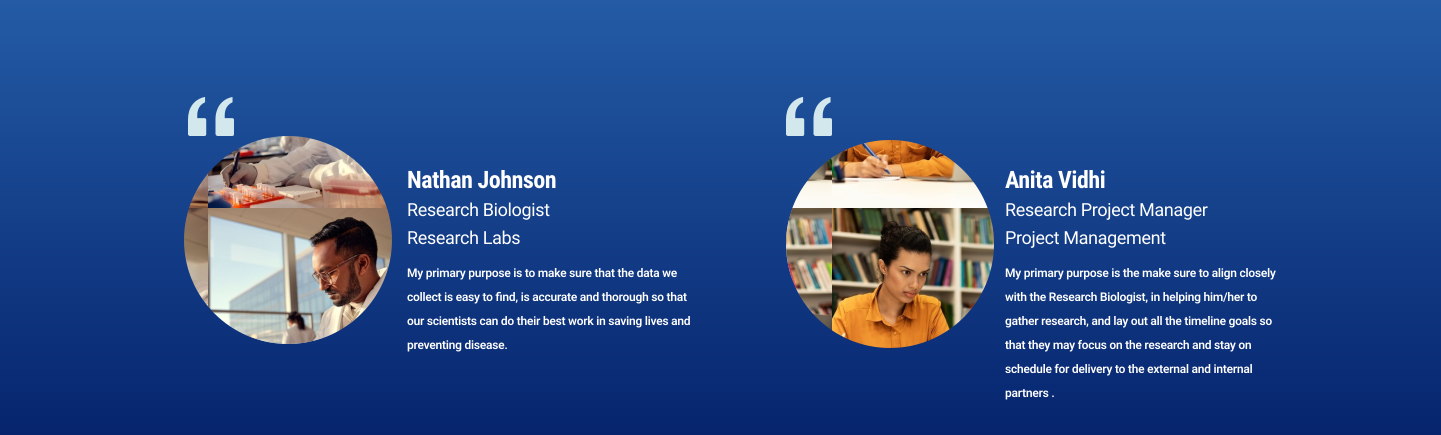
There are two primary personas that collaborate when it comes to gathering the necessary data inside the organization at Regeneron. The first one is a Research Scientist. Their duties include:
1. Conducting Research: A primary duty is to design, conduct, and analyze experiments to explore scientific questions or develop new products or technologies. This includes both theoretical research and hands-on laboratory work.
2. Data Analysis: Research scientists are responsible for analyzing the data collected from their experiments. This involves using statistical software and other tools to interpret the results and determine their significance.
3.Writing and Publishing: Scientists are expected to document their findings in detailed reports and scientific papers. Publishing research in peer-reviewed journals is a key part of sharing knowledge with the scientific community and advancing the field.
The secondary persona is the Research Project Manager. Their duties include:
1. Project Planning and Design: Developing project plans, including defining goals, timelines, and resources needed. They ensure the project aligns with the firm’s strategic objectives and scientific standards.
2. Team Coordination and Leadership: Leading interdisciplinary project teams, coordinating tasks among team members, and ensuring effective communication across departments. This includes managing scientists, technicians, and other stakeholders.
3. Budget Management: Preparing project budgets, monitoring expenditure, and making adjustments as necessary to keep the project within financial constraints." The Concept: "The client came to us with a concept that they had previously validated and needed to be built. The concept was based around aggregating all the data researchers were working on together into one central database. The database would act as a sort of dashboard where researchers and project managers could gain visibility into the pipeline of research initiatives happening inside the organization all at once. This would help streamline the flow of data to sales teams and eliminate the lag times and back-and-forth using Excel sheets and emails as the former bases for research sharing
The Concept
The client came to us with a concept that they had previously validated and that they needed built. The concept was based around aggregating all the data researchers were working on together into one central database. The database would act as a sort of dashboard where researchers and project managers could gain visibiitly into the pipeline of research initatives happening inside the ogranizaton all at once. This would help streamline the flow of data to sales teams and help elimnate the lag times and back and forth using excel sheets and emails as the former bases for research sharing.
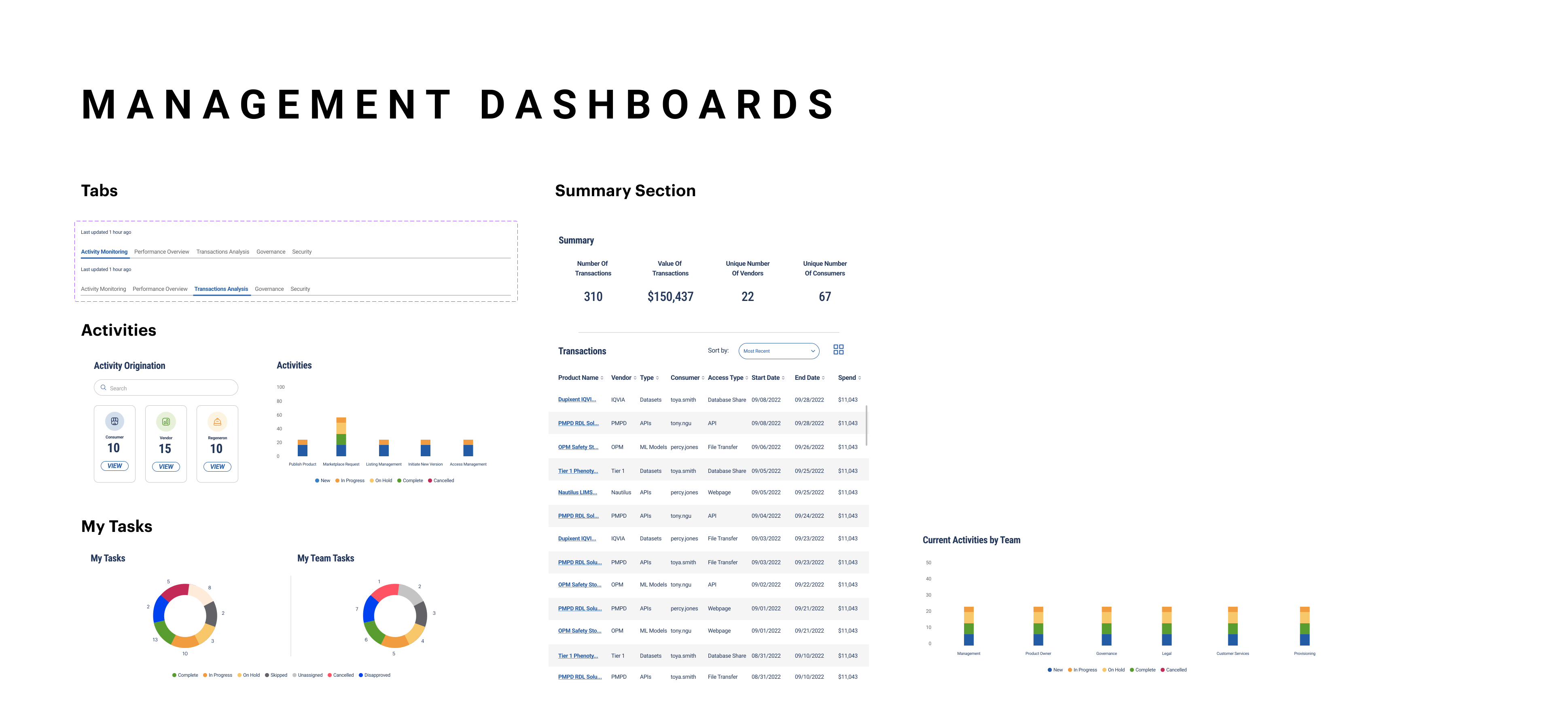
A Unified Brand and Style Guide
In addition to the dashboard work, the client requested that our agency help them develop a more unified brand and style guide which would help their Scientist and researchers navigate through the new products with ease.

Design System

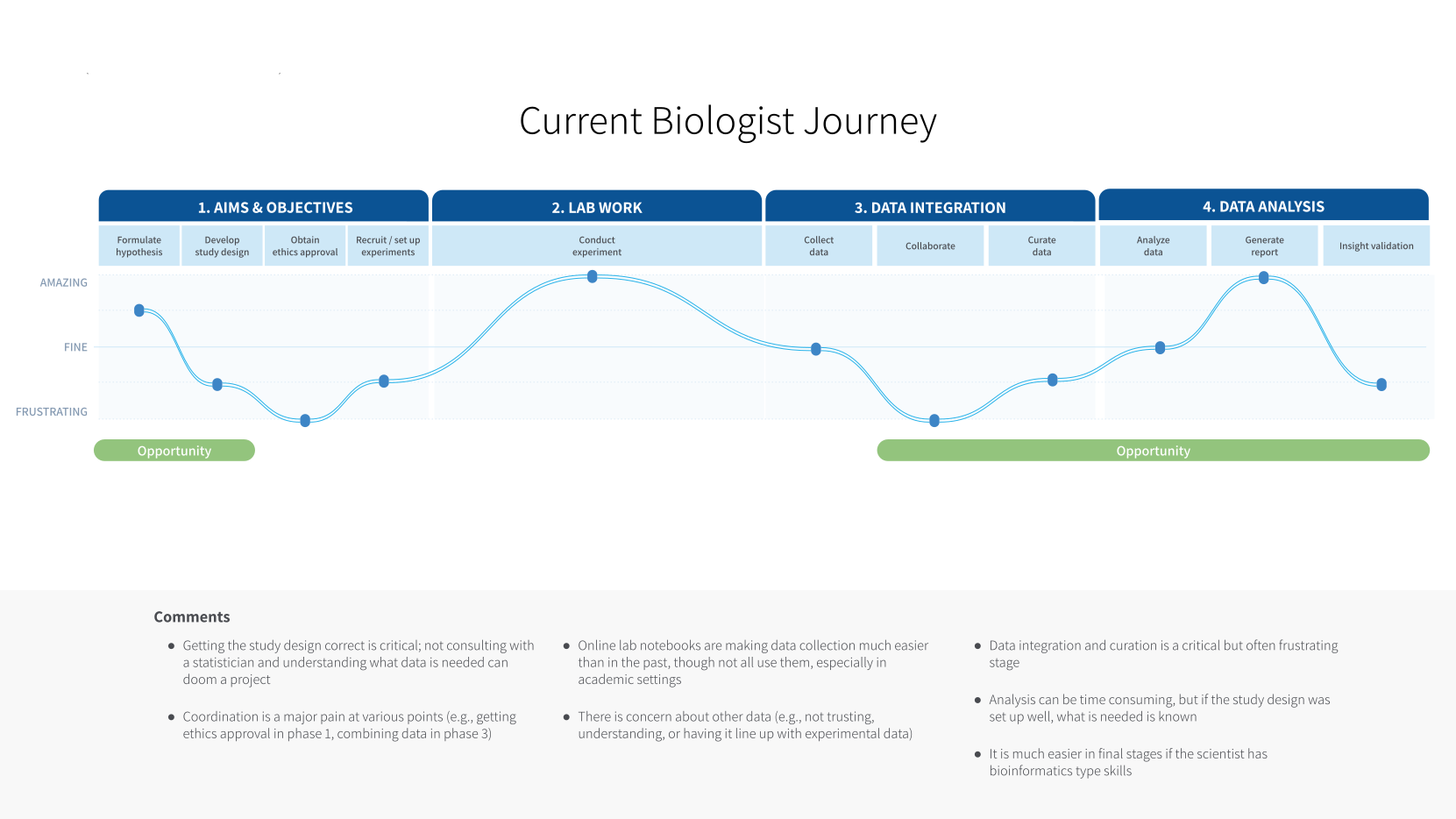
UNDERSTANDING THE USERS PAIN AND NEEDS
I wanted to get a clear picture of how our primary users went about building and creating events research and what their pain points were. Journey mapping was done to help understand how the new design could play a pivotal impact in the life of these researchers.
IDEAS INTO ACTION
As first concepts it was very important to show the team at Regneron that we were all on the same page. This set of design thumbflows was designed to make sure all agreed about the general layout and concept/ux. I designed and built a set of thumbflow wire frames.
Through our requirements gathering and ux interviews we identified 5 key stages of process that the researcher goes through which would inform our designs. These stages were:
- Landing Page/Home
- Asset Discovery
- Asset Access
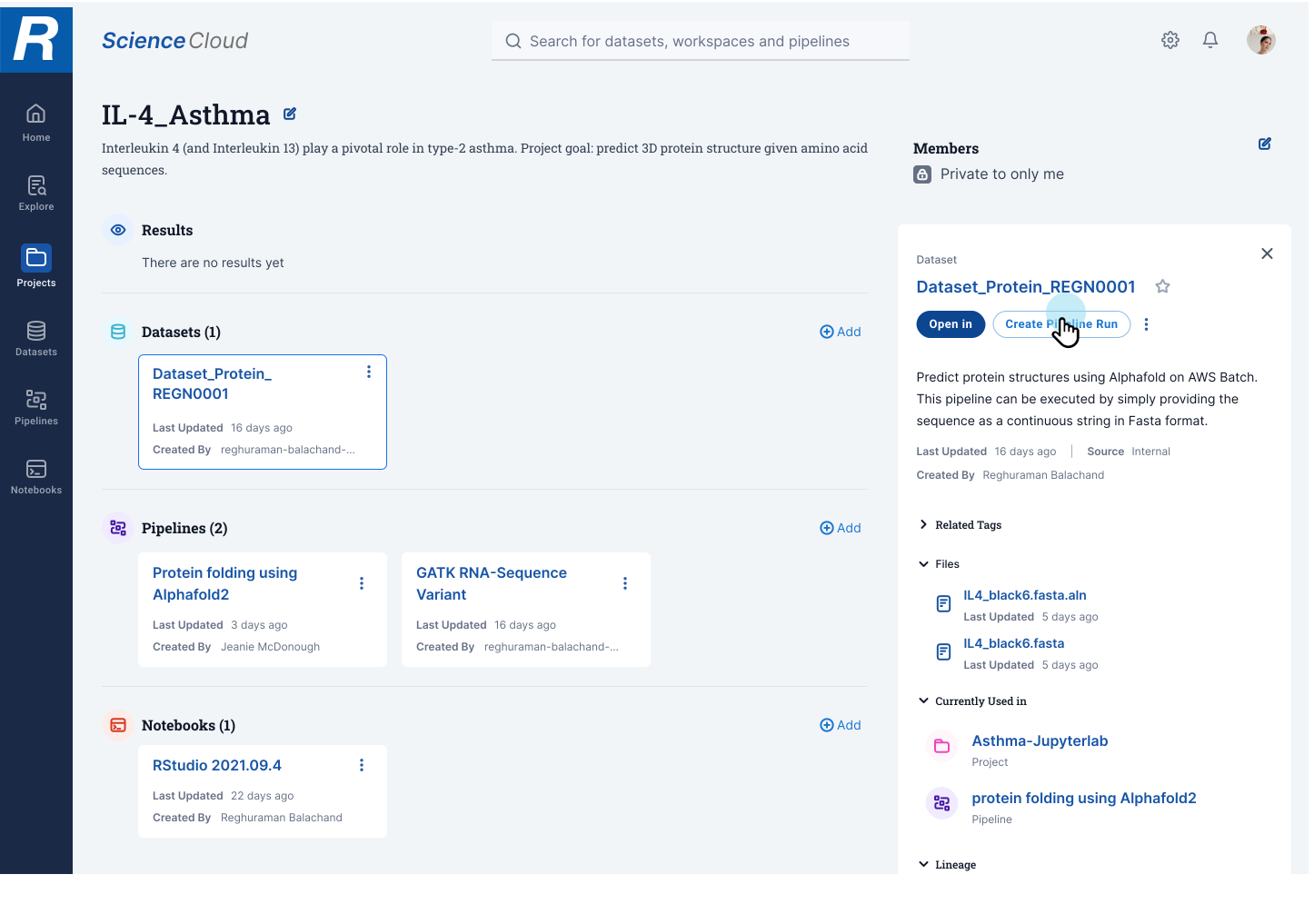
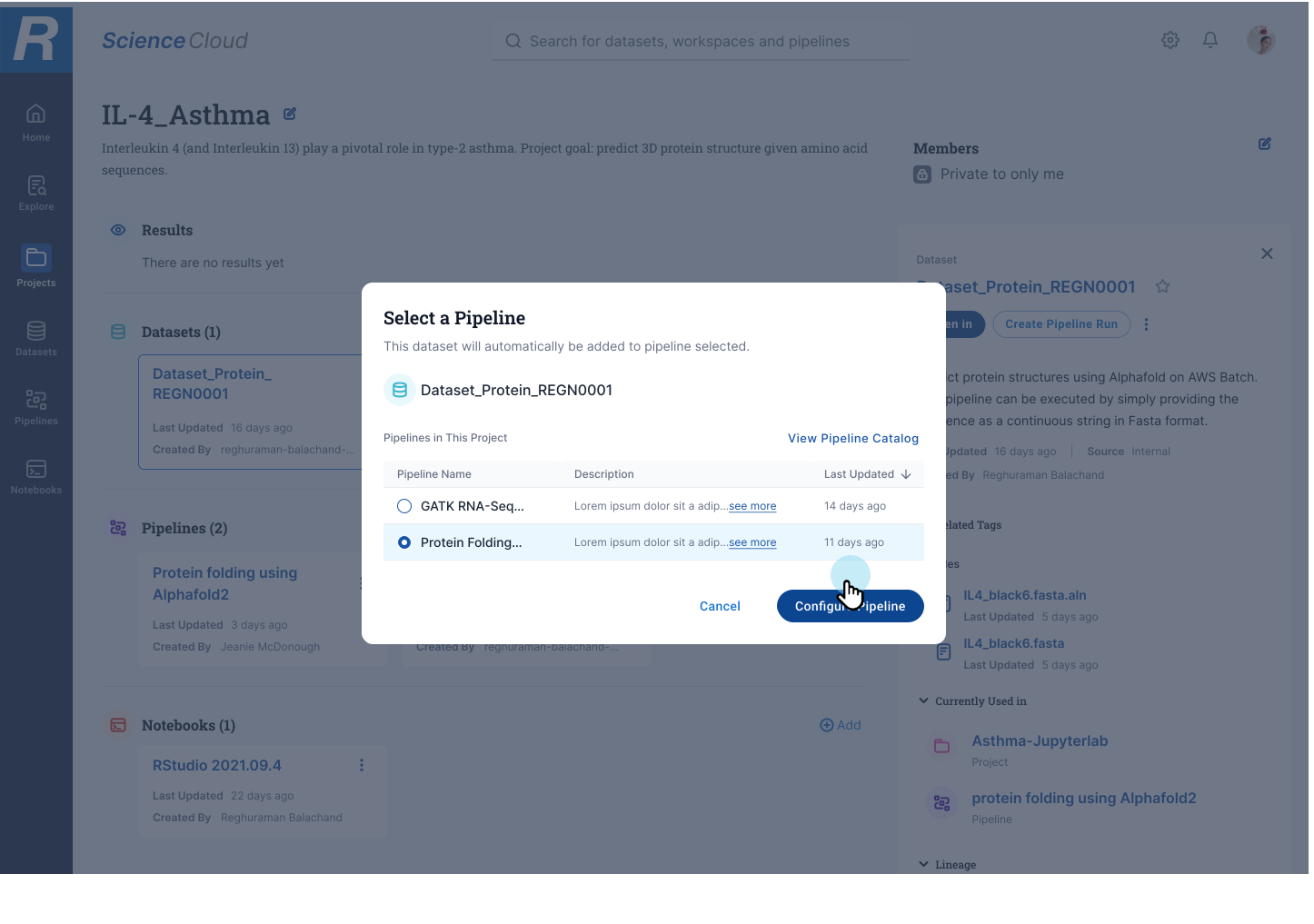
- Asset Viewing/Actions (select pipeline)
- Pipeline Creation (publishing)
Home
Default landing page for all Science Cloud users featuring;
- Recently viewed/used
- Recommended
- Favorited
- Explore (Marketplace) as a dedicated section
- Status of access requests and approvals
- Needs your attention (Approval(s) needing decision)


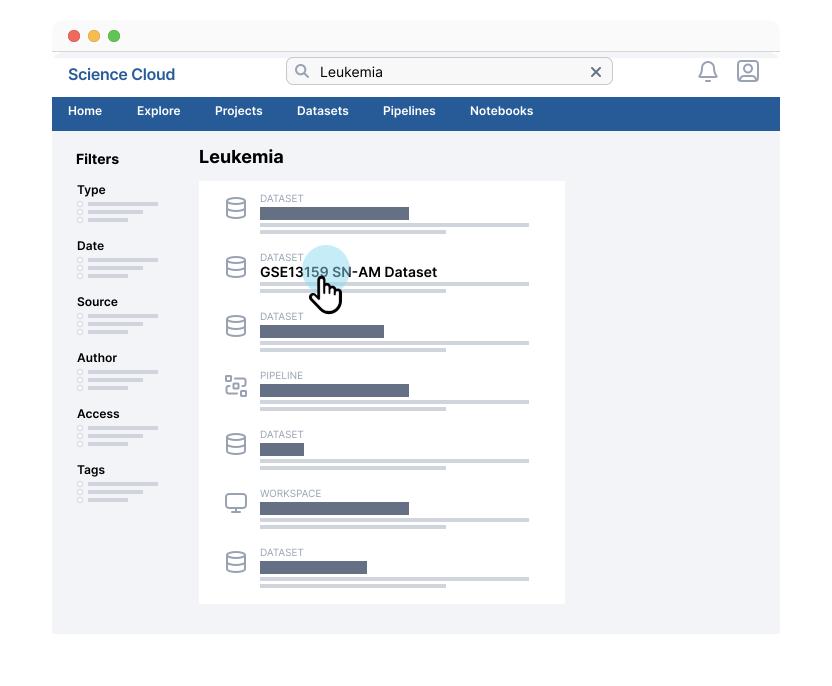
Global Search
Integrated global search across all the pages
- Can be accessed on any page within the platform.
- Integration with API through MetaBio.
- This search will allow for typeahead feedback and search across;
1. Datasets
2. Pipelines
3. Workspaces
.
Results
Each result in the list will have the ability to have an information panel appear upon click. This panel will include;
Type (data, pipeline, workspace)
Date created or publish date
Author
Tags?
Source (Internal/External)
Access (request needed / available to me / unlocked)
This will be a smaller subset of filters focused only on Data Science content types than the full offering of MetaBio filters
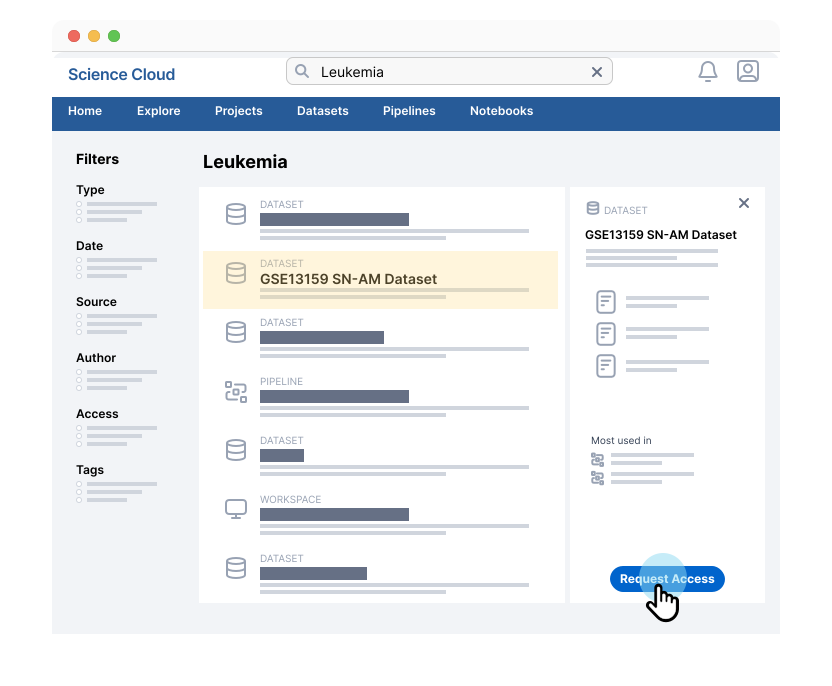
Results Detail
Each result in the list will have ability to have a information panel appear upon click. This panel will include;
- Type (data, pipeline, workspace)
- Title
- Description
- Author
- Access
- Tags
- Lineage/ Where it’s been used
- Preview of information
- Actions
- Request
- Download (only if access granted)
- Share
- Favorite
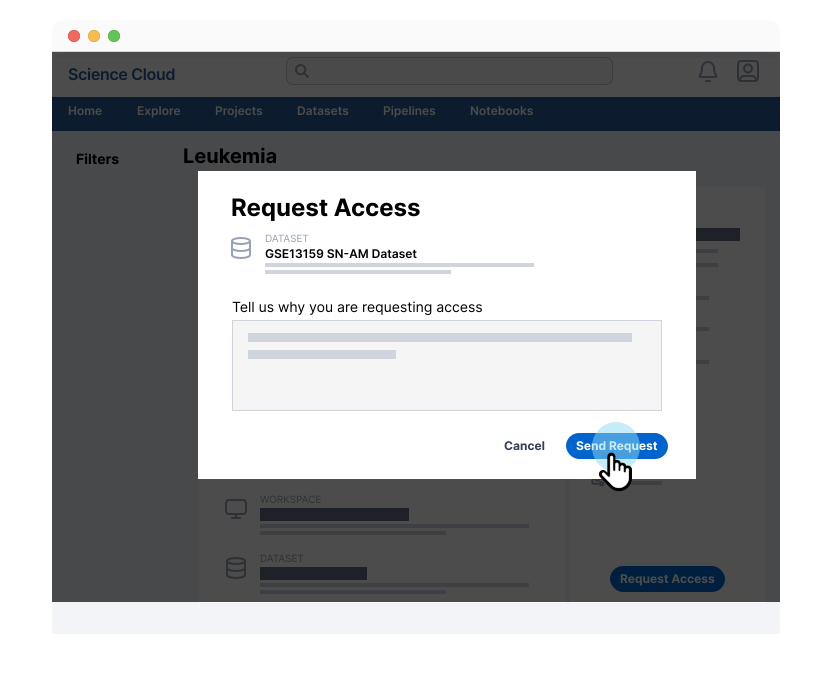
Dataset Request
Upon clicking Request Access a modal will be displayed showing:
- Asset that is being request
- Author omment field (allowing the user to add context as to why they are requesting access)
Alerting Users
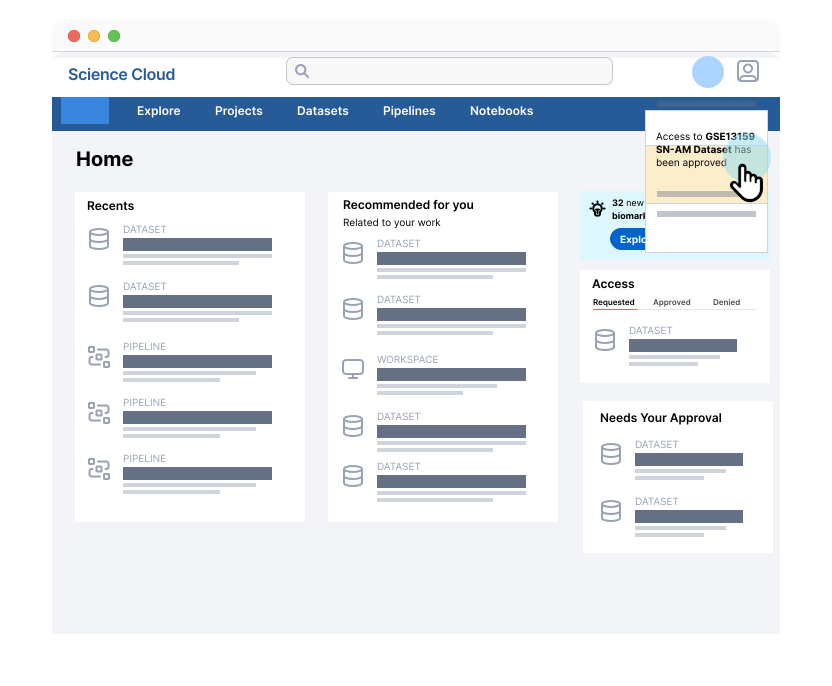
There are a few ways the user will be notified that access has been granted to an asset they have requested:
- System notification
- Email notification
- Homepage (Access section)
- Status column on asset page (Datasets, Pipelines, Workflows)
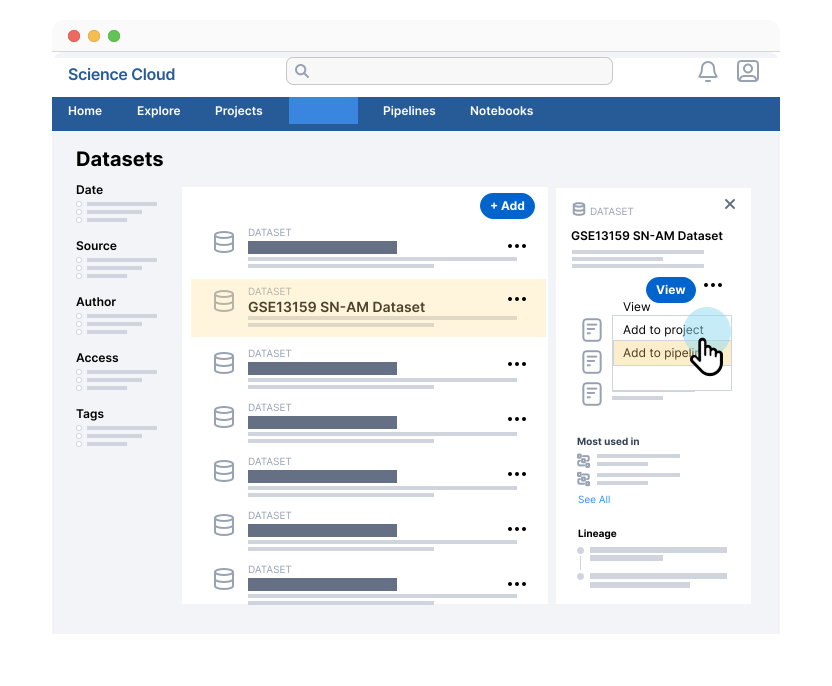
View Datasets
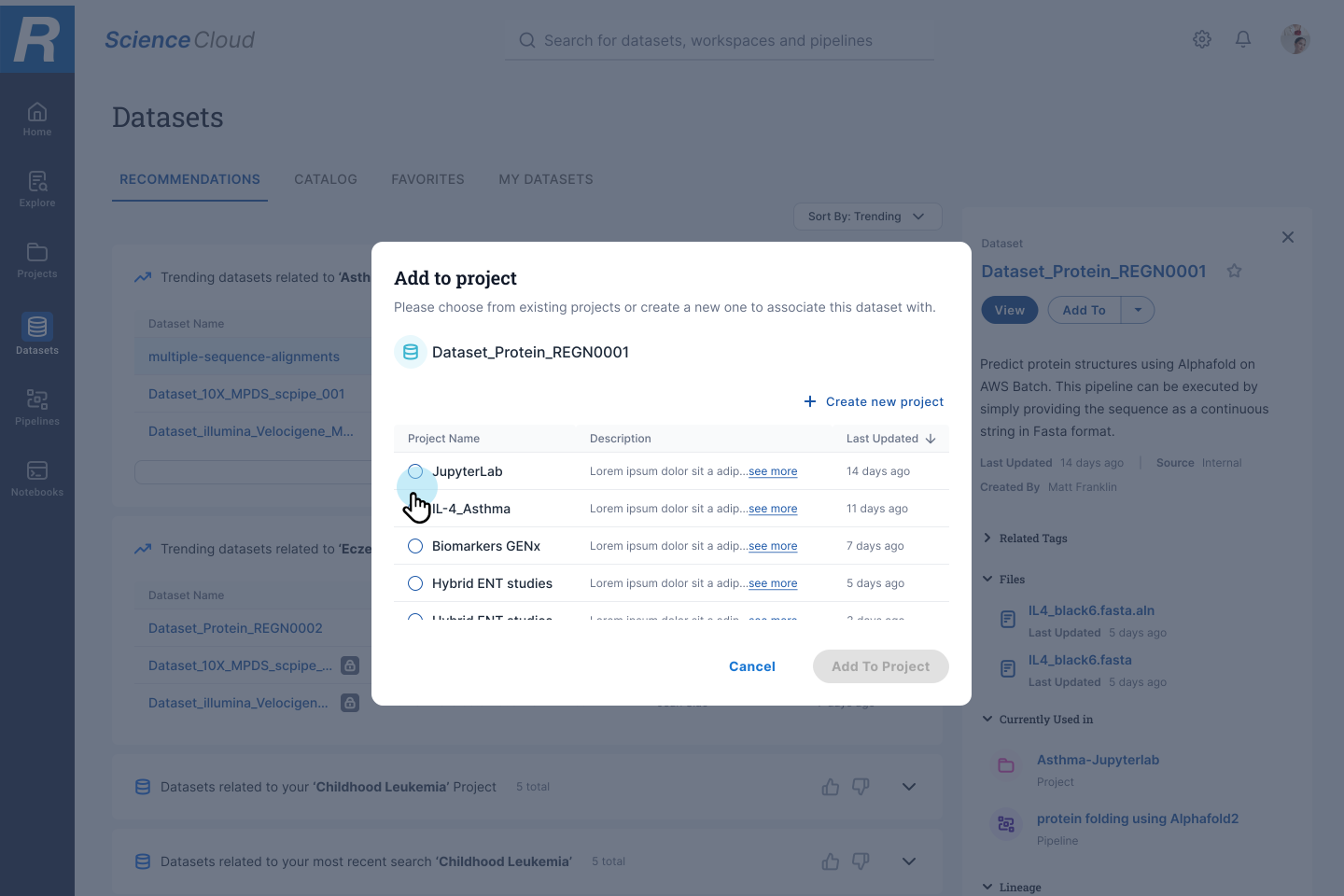
In addition to browsing and viewing all relevant datasets, the user can click on any dataset. If they already have access to the dataset, they can take an action to associate it with an existing or new pipeline. Taking this action will redirect the user from the Datasets section to the Pipelines section of the platform.

Select Pipeline
Allows the user to pick a predefined pipeline and associate the dataset. The user can preview different datasets making sure they are using the right one..
Pipeline Configure
With the dataset already defined, the user will then finish providing any additional information needed to run the pipeline.
Fields to be captured;
- Run Name
- Datasets (user defined)
- Capacity
- CPU
- Memory
- GPU
- Permissions

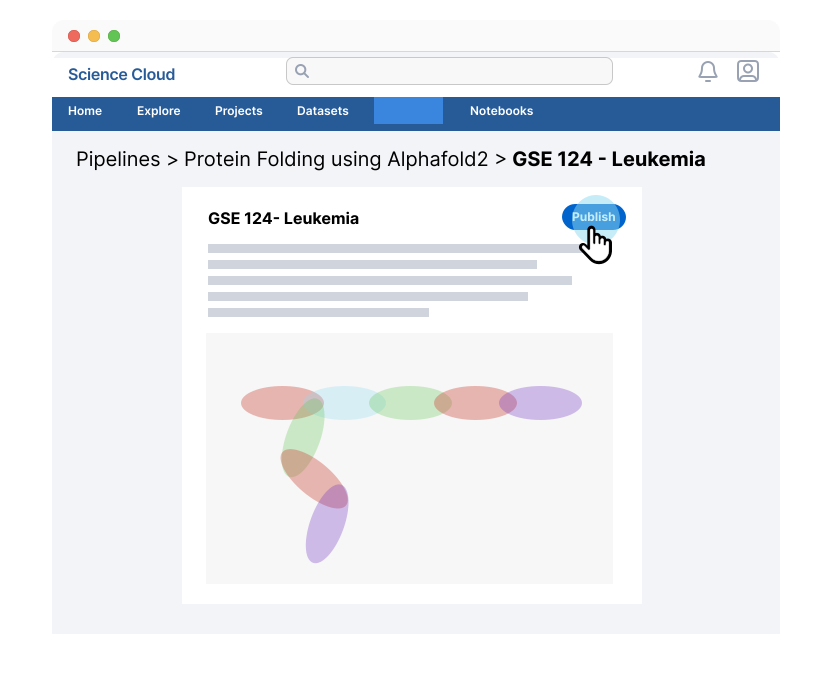
View Pipeline
Once the pipeline has been run, the user can view a run output with visuals integrated into the platform experience. The user can also modify the access settings for the results as well as share access with specific team members.
Finalized Concepts
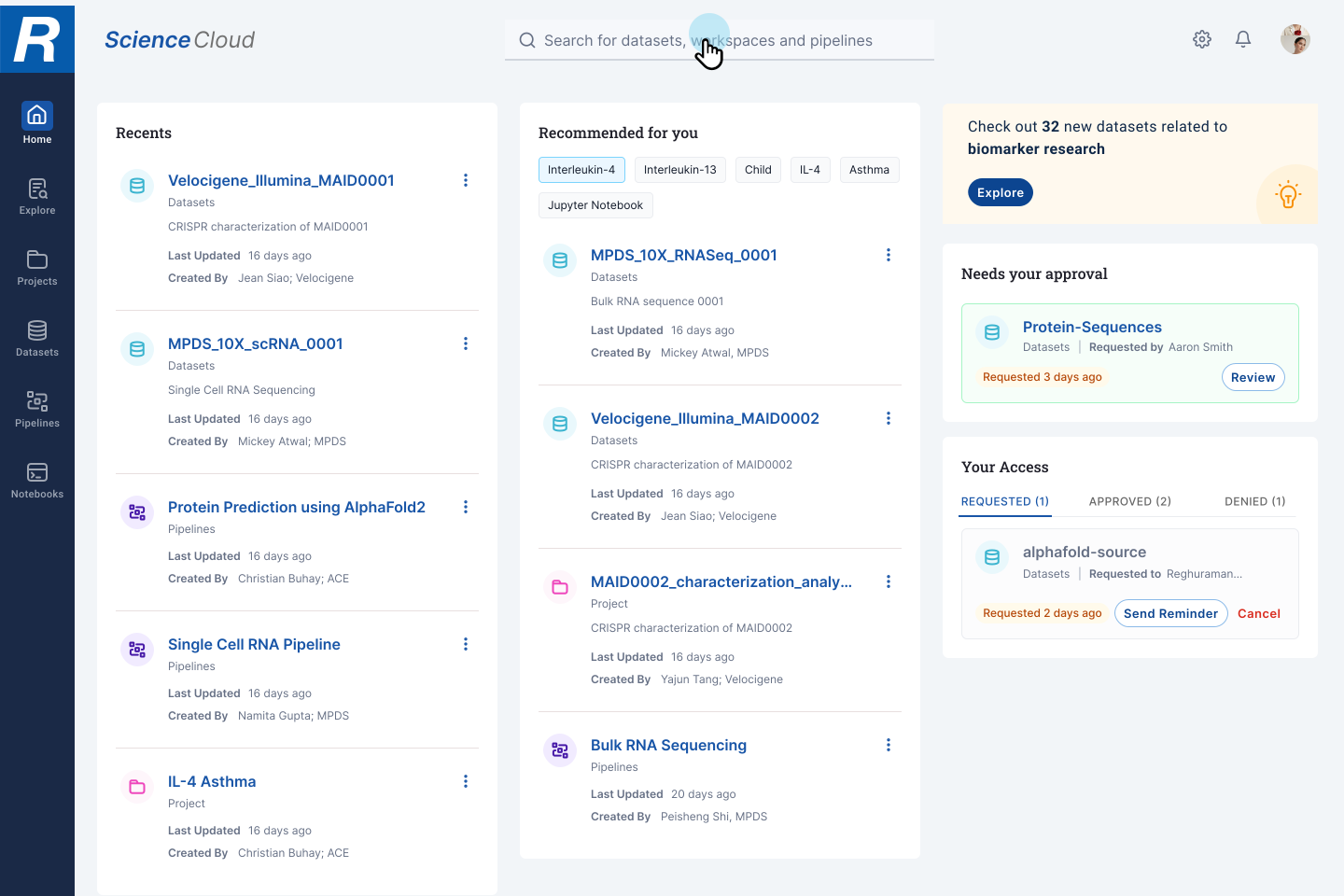
Science Cloud Dashboard
Simple & Intutive
Allowing the user to global search as well as full history of search. This gives the user more control as to what they can view and recommends items they should be viewing, taking out the guess work.

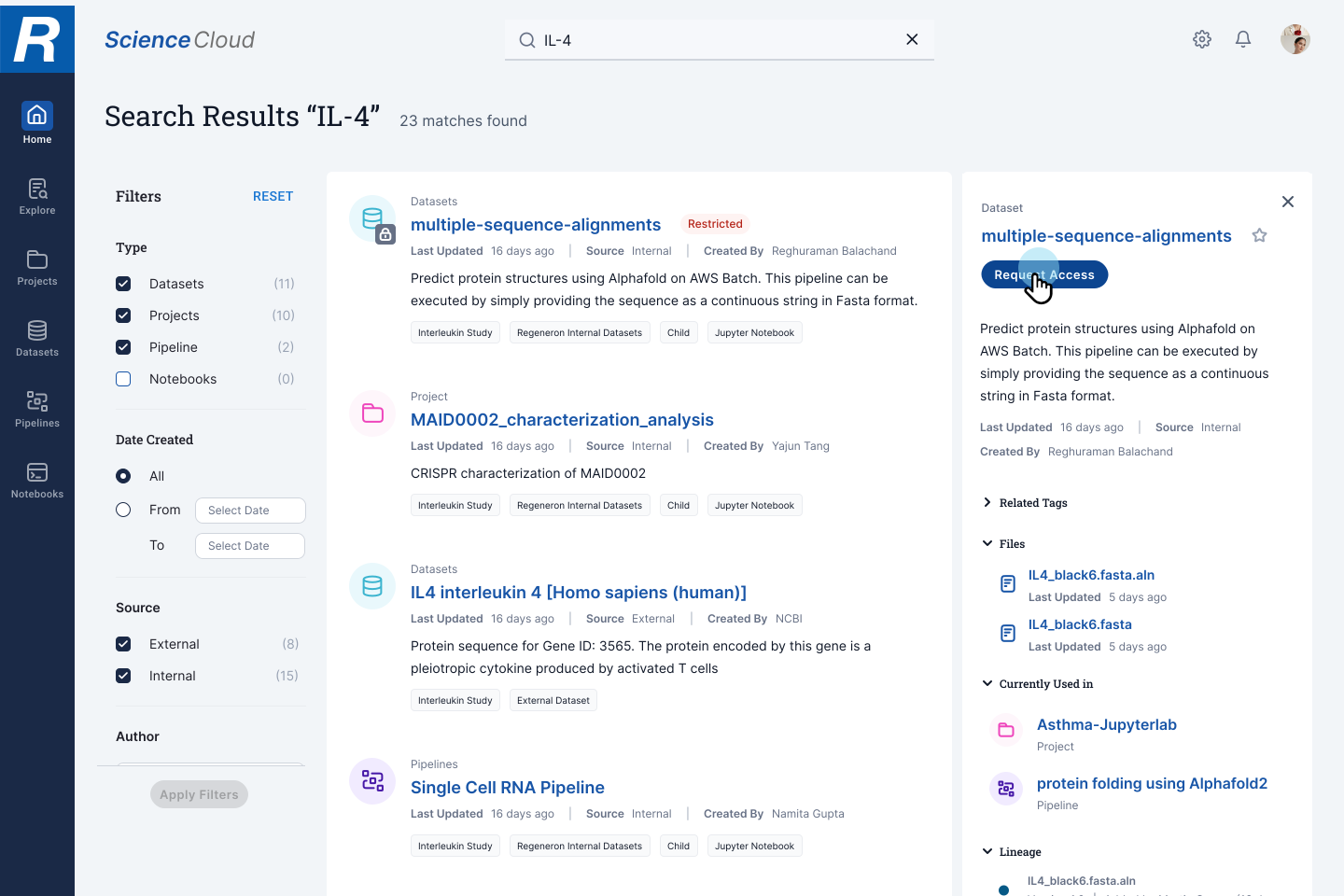
Access Request
Sharing work and giving researchers open access to data was extremely important in the workflow. By doing this we eliminate much of the back and forth with permissions requests that plagued the organization prior.



Phone: 310 717 2329
Email: brandonbreon@gmail.com | LinkedIn
Other Work

AXS iOS Mobile AppProject type

Search ProductProject type
Analytics DashboardProject type

StrategyProject type

Ticketing PlatformProject type

Medical DashboardProject type